
Workflow Steps for Patient Does Not Have Existing Dentures
| Step | Instructions | Image |
|
Important: Who is creating the bite block? 2-Appointment process - Doctor creates bite block: Complete steps Capture Records and Seat Bite Block in one appointment without sending impressions to the lab. 3-Appointment process - Lab creates bite block: Doctor must send the records captured in the first appointment (Capture Records) to the laboratory. Doctor receives bite block back from lab. Bite Block Seating is appointment two. |
||
| 1. |
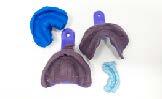
Capture Records: For a fully edentulous patient that do not have existing denture: take upper and lower standard PVS impressions capturing all landmarks and boarder extensions. |
|
| 2. |
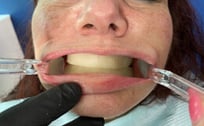
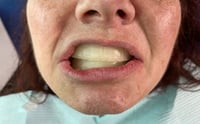
Seat Bite Block: Once the bite block is received, capture the bite and mark the bite block showing midline, cuspid lines, and high smile line. A photo of the patient with the adjusted bite block seated and the patient smiling is highly recommended for denture accuracy. Including patient photos improves the accuracy of a setup by 35%! |
  |
| 3. |
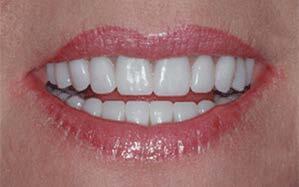
Seat Denture: The accuracy of CAD/CAM manufacturing makes for an extremely predictable fit during the seating appointment. |
 |
Additional Resources
For more information concerning ArchBridge Overdenture Solutions:
Contact Information
For help with ArchBridge Overdenture Solution's for your next case, contact ROE Dental Laboratory:
- Phone: (216) 663-2233
- Email: info@roedentallab.com