
Overview
An open-tray impression is a technique that employs impression copings attached to implants with a retaining screw extending past the tray and embedded in the impression. Before removing the impression, the clinician unscrews the coping through an opening in the tray. This direct pick-up method provides exceptional accuracy by eliminating the risk of coping displacement during removal, which is particularly crucial for multi-unit restorations.
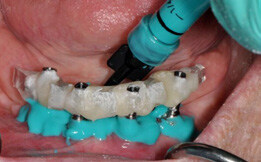
Open-tray impressions for multiple implants are highly recommended as they greatly reduce the chance of ill-fitting frameworks, which can be detrimental to implant success. The impression posts must be securely tightened and connected by resin or another splinting device. The tray requires holes for the long screws to extend through and should not contact any of the impression posts during the procedure. Any contact between the tray and posts can compromise the fit because the impression tray may be torqued or forced into position rather than remaining static and free while the material hardens.
Prerequisites
-
Implant is fully integrated
Technology & Materials
- IOS scanner or PVS impression material
- X-Ray
- Adjustment burs/drills
- Screw block-out material
- Crown cement
Workflow Steps for Open-Tray Impressions for a Crowns
| Step | Instructions | Image |
|
Important: Clinical studies demonstrate superior accuracy of open-tray impressions for capturing multiple non-parallel implants compared to closed-tray techniques. The increased procedural complexity and chairtime must be weighed against the enhanced precision needed for complex implant prostheses. With non-parallel implants, the greater the angulation differences, the higher the risk of distorting or tearing the impression material during removal. Open-tray technique helps eliminate this possibility and significantly increases the chances of success for achieving a well-fitting framework or bridge. |
||
| 1. |
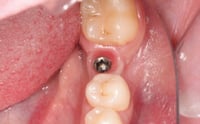
Remove the healing abutment and verify healthy, pink periimplant tissue with no signs of inflammation or recession around the implant platform. |
 |
| 2. |
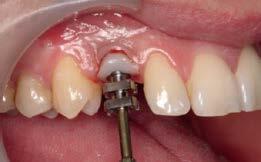
Optional: If your surgeon hasn’t used a custom healing abutment to shape the sulcus to your specifications, this is an optimal time to shape the sulcus using an impression post placed temporarily to form the desired sulcus and neck position of the tooth. |
 |
|
Important: Proper sulcus shaping improves the chances of achieving a hygienic, esthetic implant crown and enhances long-term success by reducing the risk of peri-implantitis from bacterial infiltration around an improperly contoured crown that could cause bone loss. |
||
| 3. |
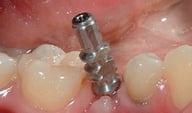
Seat open-tray impression copings on implants and finger-tighten. |
 |
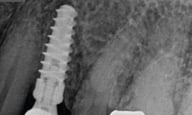
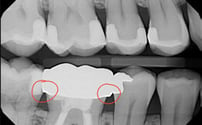
| 4. | Take periapical radiograph to verify complete seating of impression copings on implant platforms. |
 |
|
Important: Taking a periapical radiograph helps both the laboratory and the doctor ensure that impression posts were seated completely. If they weren’t fully seated during the impression, the resulting framework, bridge, or even single crown will not be accurate, leading to incorrect occlusion or contacts. Taking a periapical radiograph to ensure complete seating should be considered a mandatory step for closed-tray or any impression technique. |
||
| 5. |
Use one of two methods to fabricate an open-tray:
However, modified stock trays are not as ideal because they lack consistency in impression material thickness throughout the tray. This can create areas of varying material thickness and pressure, with thick and thin zones that may cause distortion during the impression procedure. |
|
| 6. |
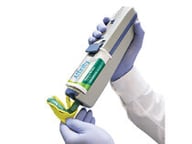
Load heavy-body material into tray while simultaneously syringe light-body material around implant copings and gingival margins for detailed tissue capture. |
|
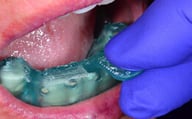
| 7. | Seat loaded tray and clear excess material from coping access holes, ensuring guide pins remain accessible; protect screw channels with wax or cotton pellets. | 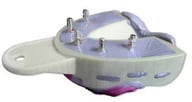
|
|
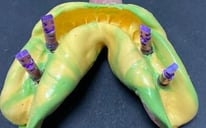
Important: Use long screws for this procedure so they protrude out from the tray and prevent impression material from covering them. It’s difficult to clear the screws if they become buried in impression material. As shown in the procedure images, the long screws should protrude through the top of the tray. Using a special implant tray designed for this purpose makes the procedure easier and facilitates smooth insertion and removal from the mouth. |
||
| 8. |
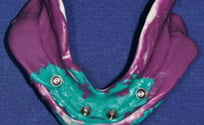
After complete polymerization, unscrew guide pins through tray openings and remove impression with embedded copings. |
 |
| 9. |
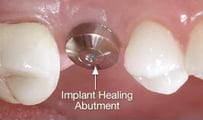
Place healing abutments or interim crowns immediately to maintain soft tissue architecture, particularly critical in esthetic zones. |
|
| 10. |
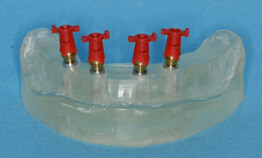
Attach analogs to impression copings through access holes, hand-tightening screws while avoiding over-rotation that could distort impression material. |
 |
|
Important: Multiple unit implant cases should be connected by some sort of plastic framework to ensure nothing moves during the impression or while screwing parts onto the impression posts. The resin around the impression posts secures them tightly and prevents them from rotating or turning, which could cause ill-fitting restorations. |
||
| 11. |
Check thoroughly for voids around coping margins and verify complete stability of all impression copings before sending to the lab. If any mobility or defects are detected, the impression must be retaken. |
|
| 12. |
Complete the Rx via www.roedentallab.com/upload. Follow the
|
|
Additional Resources
For more information concerning Crown & Bridge Solutions:
- Fixed Restorations Product Page
- Crown & Bridge Solutions - Your Guide to ROE's Fixed Restorations
- More Crown & Bridge Workflow's
Contact Information
For help with Crown & Bridge Solution's for your next case, contact ROE Dental Laboratory:
- Phone: (216) 663-2233
- Email: info@roedentallab.com