
Overview
In screw-retained implant-supported crowns, a screw securely connects the crown to the implant abutment for reliable, direct attachment to the implant platform. This design enables straightforward maintenance access and easy retrievability for future adjustments, with a simple composite filling sealing the access channel. Care must be taken to monitor for cracks or chips around the access holes.
Prerequisites
-
Implant is fully integrated
Technology & Materials
- IOS Scanner
- X-Ray
- Adjustment burs/drills
- Screw block-out material (avoid bite registration material)
Workflow Steps for Implant-Supported Crown: Screw-Retained
| Step | Instructions | Image |
|
Important: This workflow starts after the implant has been properly checked for integration, typically 2-3 months after placement. The implant must pass the percussion test, sound solid, and have an x-ray taken to ensure no bone loss, non-integration, or fenestrations that might prevent proper restoration. If the implant was placed using a two-stage protocol, a healing abutment (gingival former) should be seated, and then a healing time of at least 2 weeks between surgical exposure and impressions should be observed. The healing period with proper abutments is critical to success. Use healing abutments that represent the size of the tooth being replaced at the gum line in its natural state. This allows the crowns to be contoured to match the patient’s existing natural teeth without requiring extensive porcelain work, resulting in more hygienic and esthetic restorations with properly formed sulcus before crown fabrication. |
||
| 1. |
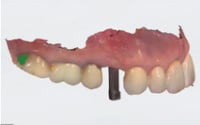
Capture impressions using one of the following methods:
|
 |
|
Important: Open-tray traditional impression is the most recommended method for anything more than one implant. Open-tray impression techniques are more accurate according to the literature, but the impression posts must be splinted together using acrylic resin or light-cured material to prevent any positional discrepancy after the impression is poured. This is especially critical for all-on-four cases or multiple implant cases with 4, 5, or 6 implants, where any incorrectly positioned implant at impression time will cause the entire restoration to fail and require remaking. Closed-tray traditional impression is not as accurate as open-tray methods, as proven in the literature. Several factors contribute to this, including potential movement if the impression tray isn’t held firmly during the procedure, which can create discrepancies and cause loose fit of the impression posts. Digital impressions are effective as long as all necessary anatomy is captured and the impression post can be properly duplicated during the scanning procedure. |
||
| 2. |
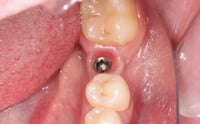
Remove the healing abutment and verify healthy, pink periimplant tissue with no signs of inflammation or recession around the implant platform. |
 |
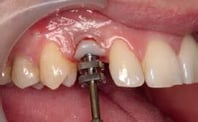
| 3. | Optional: If your surgeon hasn’t used a custom healing abutment to shape the sulcus to your specifications, this is an optimal time to shape the sulcus using an impression post placed temporarily to form the desired sulcus and neck position of the tooth. |
 |
|
Important: Proper sulcus shaping improves the chances of achieving a hygienic, esthetic implant crown and enhances long-term success by reducing the risk of peri-implantitis from bacterial infiltration around an improperly contoured crown that could cause bone loss. |
||
| 4. |
Immerse the crown in 0.12% chlorhexidine gluconate solution for 2 minutes to achieve proper sanitization before placement. |
|
| 5. |
Position the crown onto the implant and finger-tighten the abutment screw, ensuring initial engagement and alignment with the internal connection. |
|
|
Important: “Finger tight” can be interpreted differently by practitioners, so the goal is to screw the abutment down until it bottoms out, then snug it with your thumb to the point where it doesn’t wobble and feels firm and secure in the implant. Avoid using the torque wrench at this stage since you’ll need to untorque it for removal, and abutment screws are typically good for only three cycles before requiring replacement. Reserve torquing for the final positioning and cementation of the crown. |
||
| 6. | Check and adjust proximal contacts, emergence profile, and occlusal contacts in both centric and excursive movements using articulating paper. | 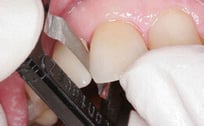
|
| 7. | Obtain a periapical radiograph to confirm complete seating of the crown-abutment interface and establish baseline documentation for future comparison. | 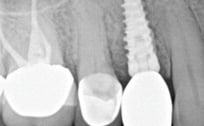
|
|
Important: Taking a periapical radiograph is an essential step because improperly adjusted contacts can prevent the crown from seating correctly, potentially causing the mesial-distal seating configuration to be compromised. This incomplete seating can lead to micro-leakage around the crown, peri-implantitis, and eventual implant loss. Taking a radiograph to verify proper seating is crucial for successful implant procedures. |
||
| 8. |
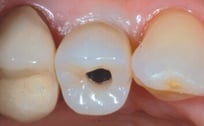
Using a calibrated torque wrench, tighten the abutment screw to the manufacturer’s specified torque value, typically between 25- 35 Ncm. This step is critical because more torque is not better - the screws are designed for the threads to handle a specific amount of torque. |
 |
|
Important: If you exceed the recommended torque value, the screw can actually break, as it’s designed to do under excessive torque as a safety mechanism to protect the implant. Following the manufacturer’s specified torque value is essential for proper function and longevity. |
||
| 9. |
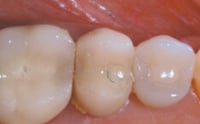
Fill the screw access channel with teflon tape or cotton pellet to the appropriate depth, then place and cure composite resin to seal the access opening. |
|
| 10. |
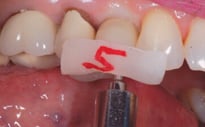
Polish all adjusted surfaces thoroughly, as this step is critical - rough, unpolished contacts can wear away adjacent natural teeth and create spacing, while rough occlusal surfaces can abrade opposing natural teeth over time. |
|

Additional Resources
For more information concerning Crown & Bridge Solutions:
- Fixed Restorations Product Page
- Crown & Bridge Solutions - Your Guide to ROE's Fixed Restorations
- More Crown & Bridge Workflow's
Contact Information
For help with Crown & Bridge Solution's for your next case, contact ROE Dental Laboratory:
- Phone: (216) 663-2233
- Email: info@roedentallab.com