
Workflow Steps for Existing Overdenture: Replace or Convert to Fixed Overdenture
| Step | Instructions | Image |
| 1. |
Using medium body PVS, perform a wash capturing the tissue detail and abutment positions. Seat the denture in occlusion. Once the PVS is set, remove the denture. |
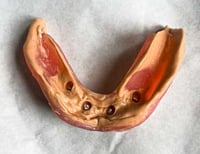 |
| 2. |
Capture 360° extraoral scan of the washed denture with the IOS. Note: If having difficulty capturing the extraoral scan, please see page 18 for more details. |
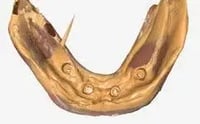 |
| 3. | After the 360° scan of the washed prosthesis, scan the opposing along with any surrounding tissue, and bite. | 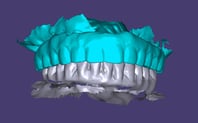 |
| 4. |
Capture a scan of the tissue and abutments. Be sure to include all tissue landmarks and vestibule. |
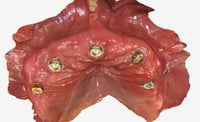
|
| 5. |
Place a scan body insert into each ArchBridge for Overdenture Scan Body, ensuring it is fully seated and flush with the base of the scan body. |
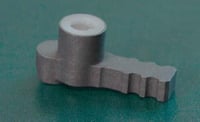 |
| 6. |
Seat one scan body onto each abutment. Rotate towards the center of the jaw, facing inwards, for best scan results. Important: Make sure the scan bodies are not touching each other and are fully seated.
|
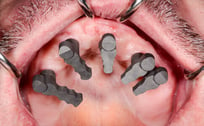 |
| 7. |
Capture an IOS scan of the scan bodies. Important: Be sure to clearly capture the complete round head of the scan body where it is attached to the abutment. |
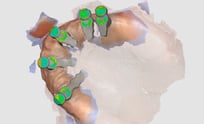 |
| 8. |
Choose ROE Dental Lab on your scanner portal and upload the following .STL files: • Bite and opposing scan |
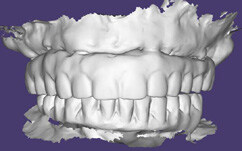 |
Additional Resources
For more information concerning ArchBridge Overdenture Solutions:
- Full-Arch Product Page
- ArchBridge for Overdenture - Your Guide to ROE's Digital Overdenture Solution
- More Overdenture Workflow's
Contact Information
For help with ArchBridge Overdenture Solution's for your next case, contact ROE Dental Laboratory:
- Phone: (216) 663-2233
- Email: info@roedentallab.com